
Designing a unified scheduling experience and scalable design systemfor a healthcare staffing app.
+30%
task efficiency, old vs new booking flows
↓ drop-offs
post-launch, faster shift booking
↑ SUS
scores and in-app satisfaction ratings
Client
Gale Healthcare Solutions
Year
2023
My Role
UX/UI Designer
Team
4 person cross-functional product team (PM + engineer + design)
Timeline
2023 (multi-sprint delivery)
Overview
The Use Gale app was designed to help healthcare facilities staff open shifts. After rapid growth following the 2020 COVID pandemic, the product hit scaling pain: clinicians were dropping off during shift booking, and facilities struggled to fill shifts reliably. I joined the clinician-facing product team to diagnose workflow breakdowns, improve end-to-end scheduling and booking flows, and evolve the design system into a foundation that could support the product's next phase of growth.
My work ran on two tracks simultaneously: maintaining and patching the live product while designing a parallel rebuild. That meant making constant judgment calls about what to fix now versus what to defer to the new system, and sequencing the rollout to avoid disrupting clinicians mid-shift cycle. I partnered closely with product and engineering throughout, translating research findings into reusable patterns that improved consistency and reduced delivery time across both tracks.
The Problem
Drop-offs weren't a motivation problem — clinicians wanted to pick up shifts. The friction was entirely structural. Research showed three compounding issues: fragmented navigation forced users across multiple screens to claim a single shift; poor information hierarchy made it hard to evaluate a shift at a glance; and in-app scheduling was weak enough that clinicians had started maintaining their own external calendars to stay organized.
The dual-track constraint shaped every decision. Changes to the live product had to be careful and targeted. We couldn't rebuild everything at once without disrupting active users. The new system had to be rolled out gradually, surface by surface, so clinicians experienced a continuous improvement rather than a disorienting overhaul. That sequencing was as much a design problem as the UX itself.
Users
Primary users were clinicians trying to pick up shifts quickly and manage unpredictable schedules. They needed fast scanning, clear shift status, and confidence that their availability + bookings were accurate without extra admin work. The broader system also served healthcare facility operators who posted shifts and managed eligibility rules; those constraints had to translate clearly into the clinician-facing experience, with the shared goal of filling coverage reliably.
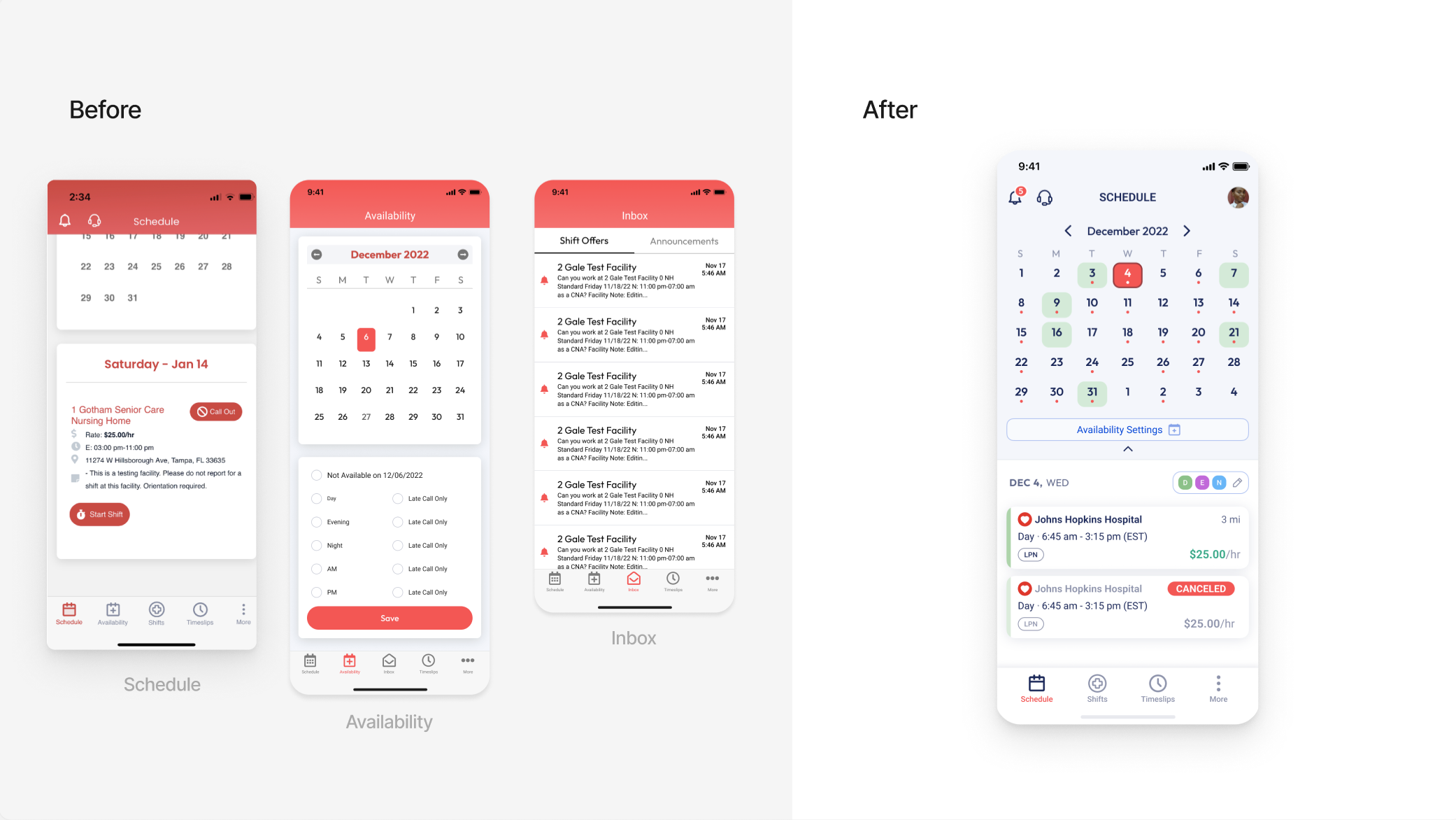
Fragmented workflow combined into one unified screen
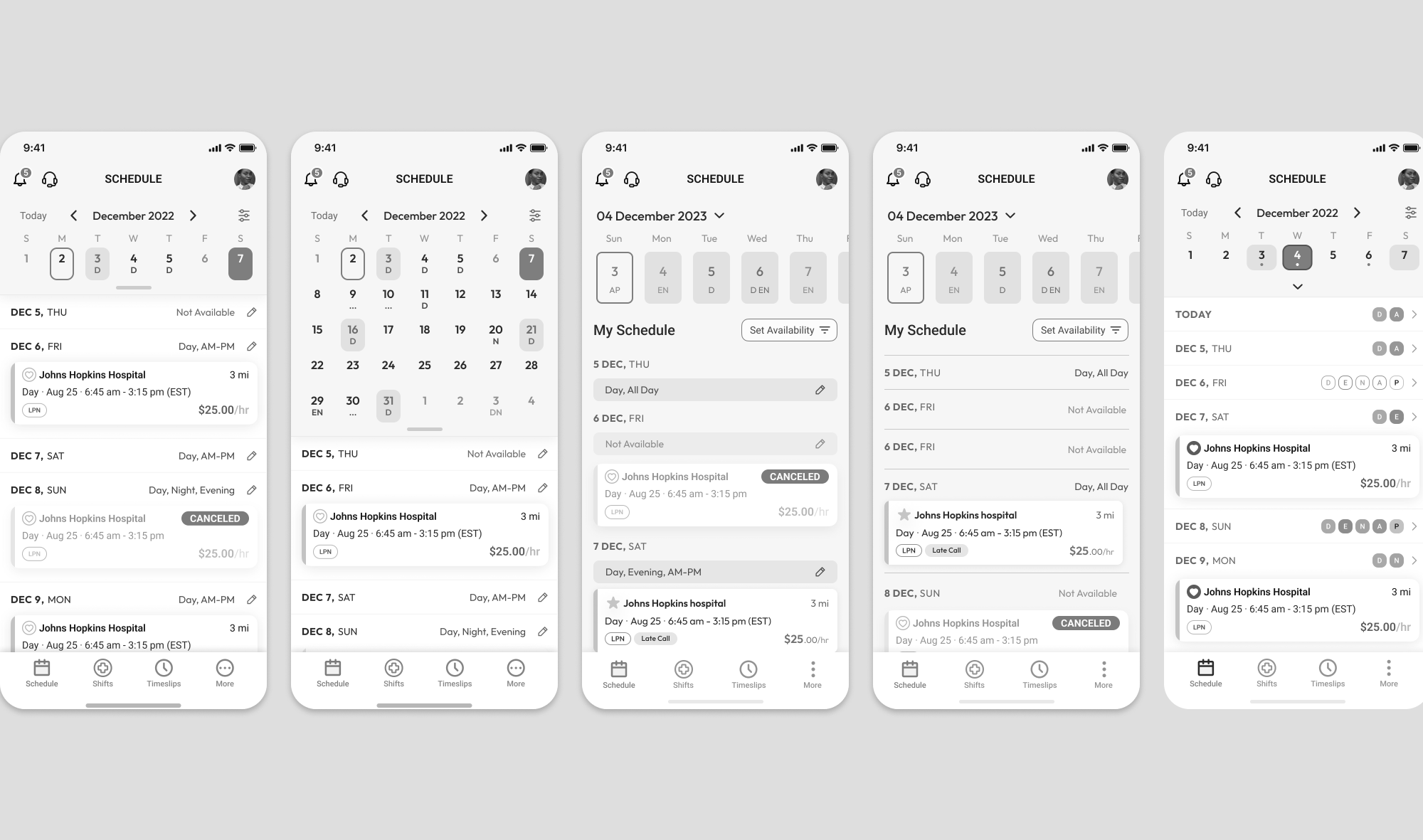
Explorations for a unified schedule, availability and management screens
I designed a unified in-app scheduling experience that reduced booking friction and improved task efficiency.
Design Process
Consolidated scheduling into one primary surface
The biggest structural fix was anchoring the experience around one in-app calendar. Clinicians could view their schedule, manage availability, and book shifts without leaving the primary surface. "Check schedule → confirm availability → book shift" became a single, legible flow instead of a multi-screen journey.Improved scanability and decision confidence
Redesigned shift cards and status indicators so clinicians could evaluate a shift in seconds — rate, location, time, and confirmation state visible without drilling in. Stronger hierarchy reduced the number of taps to commit, which mattered most for users picking up shifts between other tasks.Matched interaction patterns to real scheduling behavior
Custom date pickers, collapsible calendar views, and streamlined availability toggles were designed around how clinicians actually plan their weeks — not how a generic scheduling UI works. We validated each pattern through iterative testing using Maze, click maps, and heatmaps before rolling out.Evolved the design system in parallel
Alongside feature work, I developed scalable UI components, consistent interaction patterns, and unified visual standards. The goal was reducing the design-to-build gap: every new component had to be implementable without back-and-forth, and consistent enough that the team could extend it without me reviewing every decision.

New calendar component and variants

New schedule and availability features
In parallel, I evolved the design system to improve velocity and reduce design debt.
Outcome & Impact
Shipped a unified scheduling experience centered on an in-app calendar, with simplified booking flows, improved shift card hierarchy, and a scalable design system foundation. The gradual rollout held — clinicians experienced continuous improvement across sprints rather than a disruptive overhaul, and the new system reduced design debt enough to meaningfully accelerate future feature delivery.
Efficiency:
+30% task efficiency in timed usability testing, comparing old vs new booking flows across active healthcare professionals.Conversion:
Post-launch analytics showed faster shift booking and fewer drop-offs at the key friction points identified in research.Satisfaction:
Higher SUS scores, stronger in-app survey results, and positive clinician feedback in follow-up interviews.Team velocity:
Reduced design debt and improved build consistency through reusable components — new features shipped without relitigating foundational decisions.